All Freewares

Dup Detect

Free

Find the duplicate photos quietly eating your drive.

Runs on Windows · macOS · Linux

Who it is for

Anyone with years of phone backups, screenshots and “Copy of Copy of IMG_2043”.

Point it at a folder and it finds the pictures you have more than once — including the ones that were resized, renamed or re-saved, which is exactly where a filename comparison gives up. Nothing is deleted without you saying so, and it writes a note beside anything it moves so you can always undo it.

What it does

  • Compares the PICTURE, not the filename — catches resized and re-saved copies
  • Nothing is deleted behind your back; you review before anything moves
  • Leaves a note beside every moved file, so it is always reversible
  • Runs entirely on your own machine — no upload, no account, no cloud

Read the Manual

Everything Dup Detect does, in plain English — the same help that ships inside the app.

7 chapters

Chapter 1 of 7

Dup Detect

Finds duplicate photos by what they contain — not by filename, date or size — and files the extras away into a folder you choose.

A scan moves nothing. It produces a list. The only thing that touches a file is the Move button under that list, and it asks first, in numbers.

1 / 7

Download

Free, and the same build for everyone. Pick your system.

Windows

64-bit · Windows 10 and 11

Version
1.0.8
Build
2026.08.06.2140
Released
6 Aug 2026
Size
70 MB
Download

macOS

Universal · Apple silicon & Intel

Version
1.0.8
Build
2026.08.06.2140
Released
6 Aug 2026
Size
187 MB
Download

Linux

AppImage · x86_64

Version
1.0.8
Build
2026.08.06.2140
Released
6 Aug 2026
Size
100 MB
Download

Windows Or macOS May Warn You — Here Is Why

The first time you open Dup Detect, Windows may show a blue “Windows protected your PC” box, and macOS may say the app is from an unidentified developer. Nothing is wrong with the download. It means the same thing in both cases: we are not a registered app publisher.

Registering costs a few hundred dollars a year per platform, and this is free software we give away. So our releases are self-signed — signed by us, with our own certificate, rather than one bought from Microsoft or Apple. Their systems have simply never seen that certificate before, so they warn you. Every new small developer gets this.

On Windows, to open it anyway

  1. 1Click More info in the blue box.
  2. 2Check the app name shown matches the file you downloaded from this page.
  3. 3Click Run anyway.

You will only see this once. On macOS: right-click the app, choose Open, then Open again in the dialog.

Why you can trust the download

  • Every build is made by us from our own source code — no third-party installer, no bundled extras, no adware or toolbars.
  • Nothing is bundled with it and nothing else is installed alongside it.
  • It works entirely on your own computer. It has no account, sends nothing anywhere, and uploads none of your files.
  • Every artifact is signed, and each release ships a SHA256SUMS file so you can verify the file you downloaded is byte-for-byte the one we published.

If you would rather be certain before running anything, upload the file to VirusTotal and let seventy different scanners check it. We would rather you did that than took our word for it.

A Look Inside

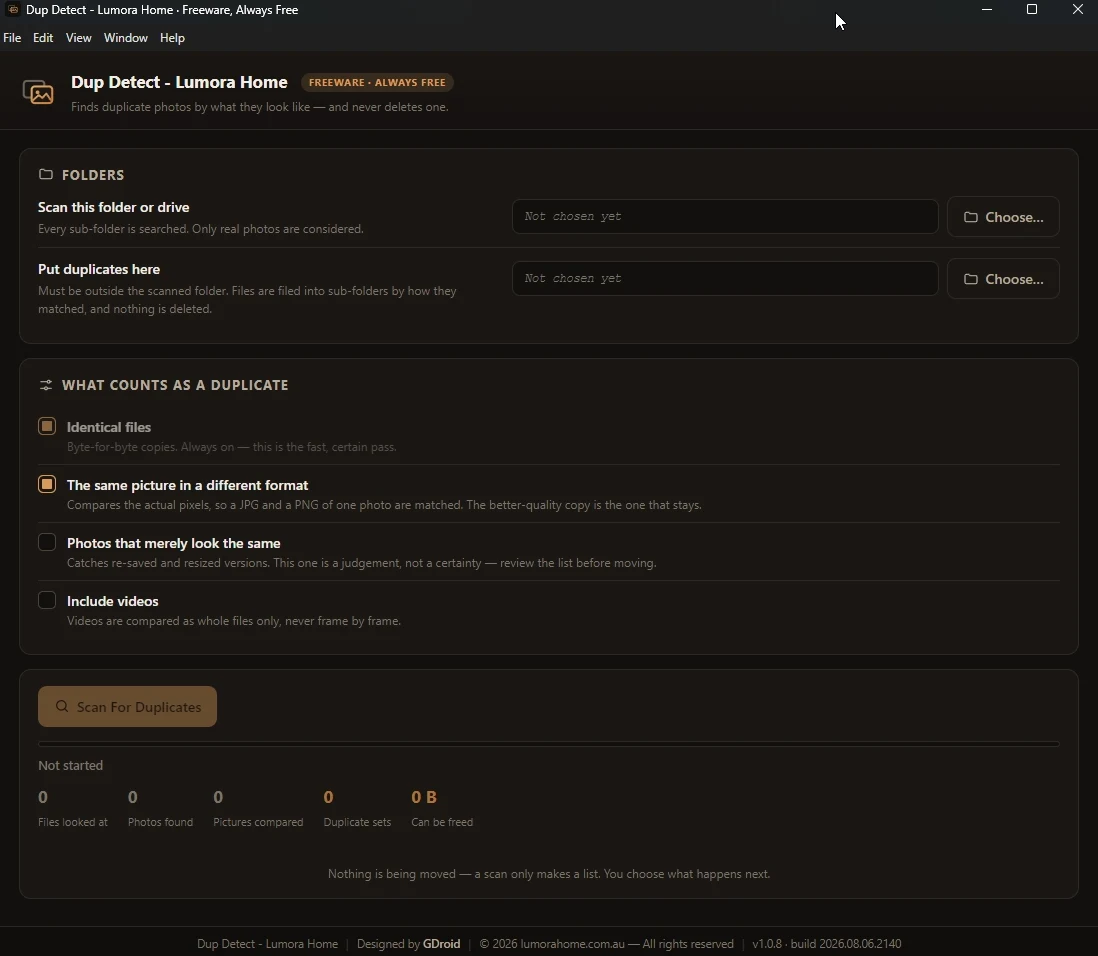
The whole app is one screen — nothing to learn, nothing hidden in menus.

Dup Detect on Windows: choose a folder to scan and where duplicates go, pick what counts as a duplicate, then scan.